Linux上の不要な周辺機器を無効化する
(2025.04.24執筆)
人によっては、パソコンの不要な周辺機器を無効化したい場合が有ります。
使わない内蔵Webカメラ、bluetooth、wifiなどの無線通信機能など。
高周波の軽減とリソースの節約のため、無線を使わず、ネット接続時はspot的に有線LANかandroidのUSBテザリングで通信する前提です。
これによりPCの省電力性が増し、セキュリティリスクの回避、電磁波(高周波)の負担が軽減されます。
これらを無効化するには3つの方法が有ります。
- bios画面上のadvanced設定で、個別に無効化(通常のbiosにはメニュがないので難易度激高)⇒ 例
- 物理的に、パソコンから内蔵カメラやwifi周辺機器などを取り外す ⇒ 別ページで解説
- etc/modprobe.d/blacklist.confで、PC起動時のモジュール読み込みを無効化する
ここでは、3番めのPC起動時のモジュール読み込みを無効化する設定を見ていきたいと思います
モジュールの一覧をみる「lsmod」
lsmod
今現在読み込まれているモジュールの一覧を見てみましょう。
ターミナルから「lsmod」と入力すると、モジュールの名前と消費メモリ、依存先モジュールを一覧で表示します。
一応表示された記述をメモしておきます。
執筆時のノートPCは、ThinkPad X270
OSはLinuxmint Xfce 20.3です
~$ lsmod
Module                  Size  Used by
btusb                  57344  0
btrtl                  20480  1 btusb
btbcm                  16384  1 btusb
btintel                24576  1 btusb
bluetooth             573440  5 btrtl,btintel,btbcm,btusb
ecdh_generic           16384  1 bluetooth
ecc                    32768  1 ecdh_generic
intel_rapl_msr         20480  0
intel_rapl_common      24576  1 intel_rapl_msr
x86_pkg_temp_thermal    20480  0
intel_powerclamp       20480  0
coretemp               20480  0
kvm                   655360  0
irqbypass              16384  1 kvm
tps6598x               16384  0
typec                  45056  1 tps6598x
crct10dif_pclmul       16384  1
mei_hdcp               24576  0
crc32_pclmul           16384  0
nls_iso8859_1          16384  1
ghash_clmulni_intel    16384  0
snd_hda_codec_hdmi     57344  1
aesni_intel           372736  0
aes_x86_64             20480  1 aesni_intel
snd_hda_codec_realtek   118784  1
crypto_simd            16384  1 aesni_intel
cryptd                 24576  2 crypto_simd,ghash_clmulni_intel
snd_hda_codec_generic    81920  1 snd_hda_codec_realtek
iwlmvm                397312  0
glue_helper            16384  1 aesni_intel
intel_cstate           20480  0
intel_rapl_perf        20480  0
mac80211              847872  1 iwlmvm
input_leds             16384  0
joydev                 28672  0
libarc4                16384  1 mac80211
serio_raw              20480  0
snd_hda_intel          53248  6
snd_intel_nhlt         20480  1 snd_hda_intel
intel_wmi_thunderbolt    20480  0
wmi_bmof               16384  0
iwlwifi               348160  1 iwlmvm
snd_hda_codec         131072  4 snd_hda_codec_generic,snd_hda_codec_hdmi,snd_hda_intel,snd_hda_codec_realtek
snd_hda_core           90112  5 snd_hda_codec_generic,snd_hda_codec_hdmi,snd_hda_intel,snd_hda_codec,snd_hda_codec_realtek
snd_hwdep              20480  1 snd_hda_codec
snd_pcm               102400  6 snd_hda_codec_hdmi,snd_hda_intel,snd_hda_codec,snd_hda_core
rtsx_pci_ms            24576  0
cfg80211              704512  3 iwlmvm,iwlwifi,mac80211
memstick               20480  1 rtsx_pci_ms
thinkpad_acpi          98304  0
nvram                  16384  1 thinkpad_acpi
ledtrig_audio          16384  3 snd_hda_codec_generic,snd_hda_codec_realtek,thinkpad_acpi
idma64                 20480  0
virt_dma               20480  1 idma64
snd_seq_midi           20480  0
intel_lpss_pci         20480  0
snd_seq_midi_event     16384  1 snd_seq_midi
mei_me                 40960  1
mei                   102400  3 mei_hdcp,mei_me
intel_lpss             16384  1 intel_lpss_pci
snd_rawmidi            36864  1 snd_seq_midi
snd_seq                69632  2 snd_seq_midi,snd_seq_midi_event
intel_xhci_usb_role_switch    16384  0
roles                  16384  1 intel_xhci_usb_role_switch
snd_seq_device         16384  3 snd_seq,snd_seq_midi,snd_rawmidi
intel_pch_thermal      16384  0
snd_timer              36864  2 snd_seq,snd_pcm
snd                    86016  22 snd_hda_codec_generic,snd_seq,snd_seq_device,snd_hda_codec_hdmi,snd_hwdep,snd_hda_intel,snd_hda_codec,snd_hda_codec_realtek,snd_timer,thinkpad_acpi,snd_pcm,snd_rawmidi
i2c_multi_instantiate    20480  0
soundcore              16384  1 snd
acpi_pad              184320  0
mac_hid                16384  0
ip6t_REJECT            16384  1
nf_reject_ipv6         20480  1 ip6t_REJECT
nf_log_ipv6            16384  5
xt_hl                  16384  22
ip6t_rt                20480  3
ipt_REJECT             16384  1
nf_reject_ipv4         16384  1 ipt_REJECT
nf_log_ipv4            16384  5
nf_log_common          16384  2 nf_log_ipv4,nf_log_ipv6
xt_LOG                 20480  10
xt_limit               16384  13
xt_tcpudp              20480  18
xt_addrtype            16384  4
xt_conntrack           16384  16
sch_fq_codel           20480  1
ip6table_filter        16384  1
ip6_tables             32768  53 ip6table_filter
nf_conntrack_netbios_ns    16384  0
cuse                   16384  3
nf_conntrack_broadcast    16384  1 nf_conntrack_netbios_ns
nf_nat_ftp             20480  0
nf_nat                 40960  1 nf_nat_ftp
nf_conntrack_ftp       24576  1 nf_nat_ftp
nf_conntrack          139264  6 xt_conntrack,nf_nat,nf_nat_ftp,nf_conntrack_netbios_ns,nf_conntrack_broadcast,nf_conntrack_ftp
nf_defrag_ipv6         24576  1 nf_conntrack
nf_defrag_ipv4         16384  1 nf_conntrack
parport_pc             40960  0
ppdev                  24576  0
lp                     20480  0
iptable_filter         16384  1
parport                53248  3 parport_pc,lp,ppdev
bpfilter               24576  0
ip_tables              32768  9 iptable_filter
x_tables               40960  13 ip6table_filter,xt_conntrack,iptable_filter,xt_LOG,xt_tcpudp,xt_addrtype,ip6t_rt,ip6_tables,ipt_REJECT,ip_tables,xt_limit,xt_hl,ip6t_REJECT
autofs4                45056  2
btrfs                1236992  0
xor                    24576  1 btrfs
zstd_compress         163840  1 btrfs
raid6_pq              114688  1 btrfs
libcrc32c              16384  3 nf_conntrack,nf_nat,btrfs
dm_mirror              24576  0
dm_region_hash         20480  1 dm_mirror
dm_log                 20480  2 dm_region_hash,dm_mirror
i915                 1937408  4
i2c_algo_bit           16384  1 i915
drm_kms_helper        180224  1 i915
syscopyarea            16384  1 drm_kms_helper
rtsx_pci_sdmmc         28672  0
sysfillrect            16384  1 drm_kms_helper
sysimgblt              16384  1 drm_kms_helper
psmouse               151552  0
fb_sys_fops            16384  1 drm_kms_helper
e1000e                253952  0
ahci                   40960  2
drm                   491520  6 drm_kms_helper,i915
rtsx_pci               69632  2 rtsx_pci_sdmmc,rtsx_pci_ms
libahci                32768  1 ahci
wmi                    32768  2 intel_wmi_thunderbolt,wmi_bmof
video                  49152  2 thinkpad_acpi,i915
内訳の中の要らない項目を無効化する
例:bluetoothを無効化
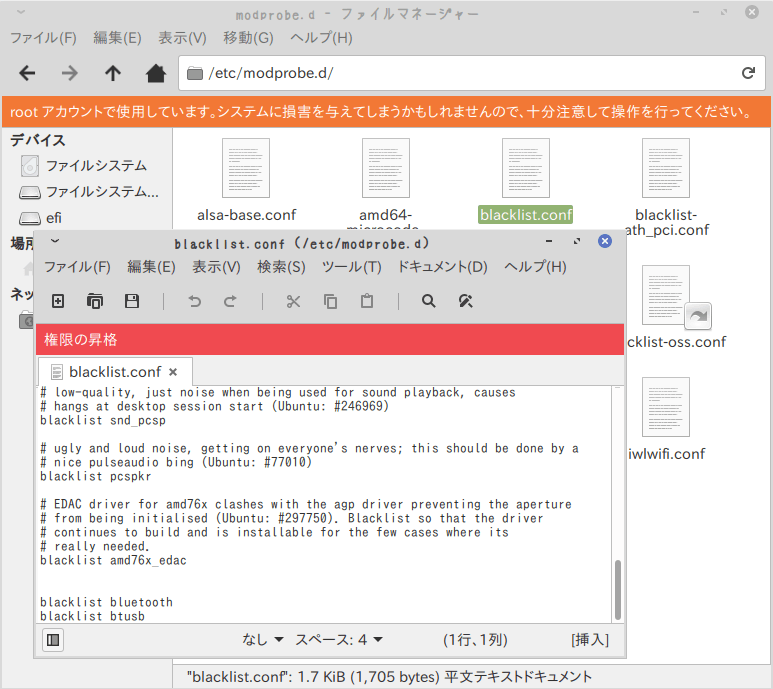
次の3行を末尾に追加します。
これはBluetoothモジュールの読み取りを無効化する記述です。
もしBluetoothを使わないのであれば、これで起動時間のさらなる短縮とリソースの節約になります。
# bluetoothの無効化
blacklist bluetooth
blacklist btusb
画面↓のような感じになります。
参考 ⇒ Linux起動時にBluetoothを無効化する方法
例:内蔵カメラを無効化
etc/modprobe.d/フォルダをルート権限で開き、blacklist.confを開いて以下を追記します。# 内蔵カメラの無効化
blacklist uvcvideo
例:wifi(無線LAN)を無効化
etc/modprobe.d/フォルダをルート権限で開き、blacklist.confを開いて以下を追記します。# wifiの無効化
blacklist iwlwifi
wifiのモジュール名は、お使いの機種名で変わります。
lsmodでそれらしきモジュールに当たりをつけてみてください。
iwlmvmとかiwldvmとかの周辺です。
(wifiを無効化する人は極稀だと思いますが、。。)
無効化した項目を、再び有効化する
無効化したモジュールが必要になったとき、追記の行の先頭に#を付けて再起動すると、以降その行は無効化をスキップ(有効な状態に)できます。
# bluetoothの無効化
#blacklist bluetooth
#blacklist btusb

# 内蔵カメラの無効化
#blacklist uvcvideo

# wifiの無効化
#blacklist iwlwifi